
 English
 中文
中文 العربية
 español

Introduction
GPU heat density isn’t creeping up anymore—it’s jumping.
Key Takeaway: Cooling decisions for AI racks are now a reliability and procurement decision, not just a mechanical design choice.
That’s why the cooling conversation has shifted from “what’s the most efficient chiller?” to “what cooling architecture still gives us predictable headroom at 30–50+ kW/rack, with measurable PUE and a controllable failure surface?” Operators are also looking at this through the grid lens: the U.S. Department of Energy notes U.S. data centers rose from 58 TWh (2014) to 176 TWh (2023), with projections of 325–580 TWh by 2028—an attention magnet for utilities, regulators, and procurement committees alike.
Air cooling isn’t dead, but it has hard physics and practical limits in modern AI racks. More airflow means more fan power, higher pressure drops, and more ways for hot air to short‑circuit back to inlets. Once density climbs, the cheapest path is rarely “more CRAC.” It’s usually a hybrid approach that pulls the highest‑grade heat off the chips and hands the remainder to the room.
Liquid and hybrid designs help because they move more heat with less parasitic energy, and they can often operate at warmer coolant temperatures—improving heat‑rejection efficiency and, in some climates, increasing the hours you can run without heavy mechanical cooling. The Lawrence Berkeley National Laboratory team describes liquid cooling as valuable specifically when high‑density electronics push air systems beyond their practical envelope, and when facility loops/heat rejection can support warmer, more efficient operation.
The GPU heat reality
If you’re buying edge capacity, the trap is treating rack density as a “future problem.” In practice, GPU refresh cycles can turn a comfortable room into a thermally constrained one in a single procurement cycle.
Density thresholds today
There’s no single industry “standard” rack density threshold because workloads, chassis layouts, and ambient conditions vary. But there is a consistent operational pattern:
-
Below ~15–20 kW/rack, well‑designed air cooling with containment and good airflow discipline is usually manageable.
-
Around ~20–30 kW/rack, air-only designs start to feel fragile—especially for GPU‑heavy racks where hotspots drive the risk.
-
Above ~30 kW/rack, liquid-assisted options stop being “nice to have” and become the straightforward way to restore margin.
The reason this matters for edge and modular deployments is that you may not have the luxury of a large mechanical plant and generous white-space airflow. Dense racks can appear in compact footprints, and you need an architecture that scales down cleanly without becoming maintenance-heavy.
A practical reference point: Colovore’s discussion of current high-density practice describes RDHx commonly sized around ~40 kW per rack as an upgrade path, with direct liquid cooling planned for much higher future densities.
Why air-only fails
Air cooling fails in AI racks less because “air can’t cool” and more because the system cost of moving enough air becomes punitive.
Typical failure modes look like this:
-
Fan power inflation: as you try to hold inlet temperatures stable, server fans ramp. Fan energy may not dominate site power, but it becomes a meaningful, constant tax.
-
Recirculation and bypass: you can do everything “right” on paper and still get hot exhaust short-circuiting into inlets when cable cutouts, blanking panels, and pressure differentials aren’t perfect.
-
Hotspot sensitivity: GPUs don’t heat a rack evenly. A few localized components can set the safety margin for the whole system.
-
Operational brittleness: filters, blocked tiles, small containment leaks, or fan-wall issues show up as temperature instability rather than “a small efficiency hit.”
In other words, the limiting factor isn’t just capacity—it’s predictability. Decision-stage buyers care less about theoretical max cooling and more about how stable the temperature and alarms are under real operating variance.
Metrics that matter (PUE, WUE)
When teams argue about cooling, they often argue past each other because they’re using different scorecards.
PUE (Power Usage Effectiveness) is the headline metric for energy overhead:
-
PUE compares total facility energy to the energy used by IT equipment.
-
Lower is better, but the catch is boundary definition and metering quality. A “good PUE” that can’t be reproduced from measured meters isn’t decision-grade.
WUE (Water Usage Effectiveness) is the water side of the equation:
-
WUE normalizes operational water use against IT energy.
-
It becomes a first-class constraint in water-stressed regions and for sites where permitting and community impact are part of the go/no-go.
Cooling architecture influences both, often in opposite directions. Evaporative heat rejection can reduce electrical cooling energy (improving PUE) while consuming more water (worsening WUE). Liquid cooling can improve energy efficiency by moving heat closer to the source and enabling warmer facility-water operation, but the WUE outcome still depends on whether your heat rejection is tower-based or dry.
Key Takeaway: Evaluate PUE and WUE together, with an explicit system boundary and a metering plan you can audit.
Modern cooling options
Most decision-stage teams don’t choose a technology in isolation—they choose a cooling architecture that matches their density roadmap, retrofit constraints, and operational maturity.
In practice, the choice is driven by four things: your density target, how much you can change the IT stack, how much retrofit disruption you can tolerate, and how you’ll monitor and respond to failures.
Direct-to-chip liquid
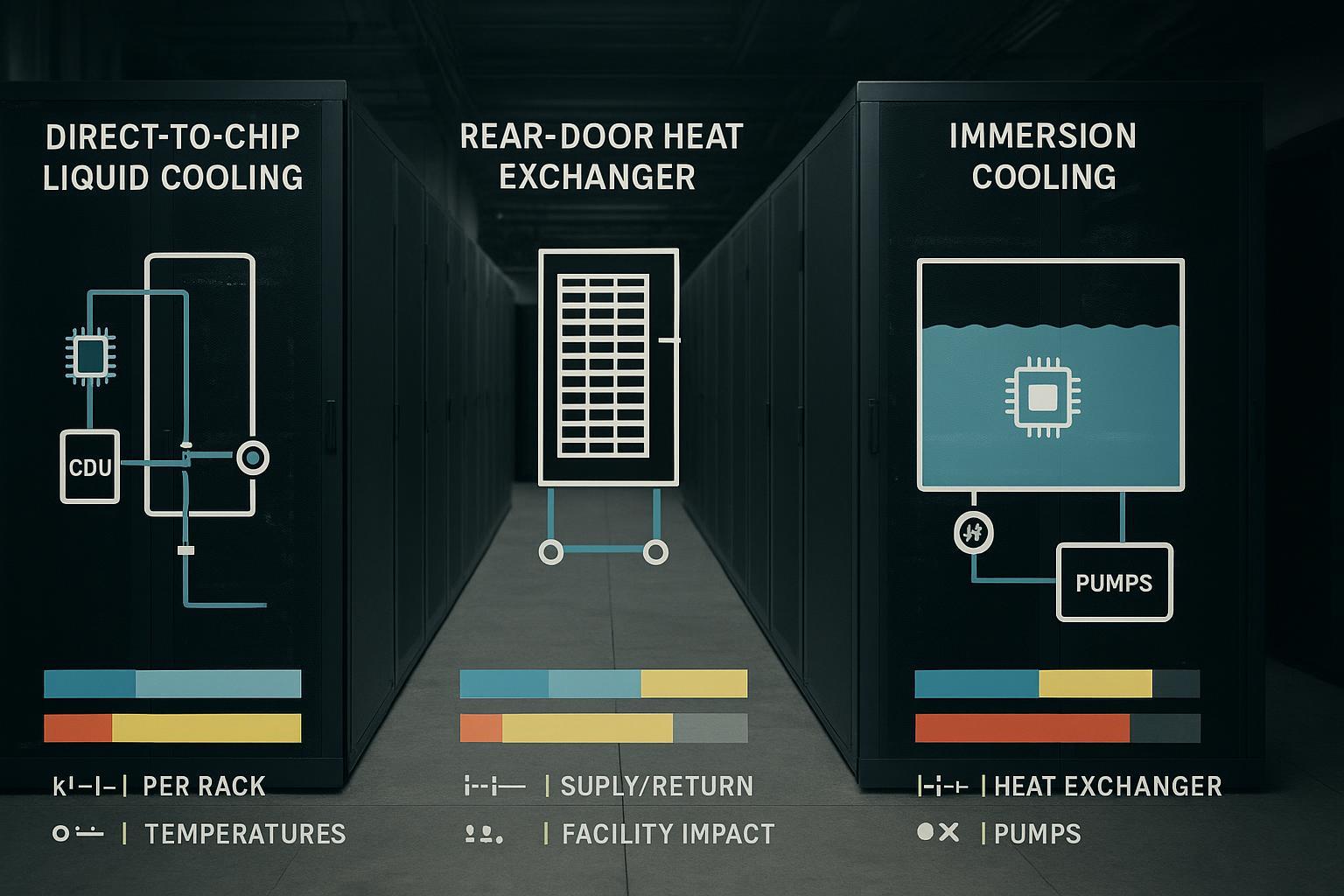
Direct-to-chip (DTC) liquid cooling removes heat at the component level—typically via cold plates on GPUs/CPUs—and transports it through a coolant loop to a heat exchanger (often inside a CDU) that interfaces with facility water.
What it buys you:
-
Higher density headroom without trying to brute-force airflow.
-
More stable component temperatures, which reduces throttling risk.
-
A path to warmer water, which can improve heat rejection efficiency and expand economizer hours in suitable climates.
What it costs you:
-
A new failure surface (connectors, hoses, manifolds, pumps, heat exchanger control).
-
Commissioning complexity: you need a tighter specification for supply/return temperatures, flow rates, differential pressures, filtration, and fluid quality.
-
Operations training: leak response, maintenance windows, and spare strategy shift.
LBNL’s overview emphasizes that liquid cooling is valuable when high-density loads outgrow air systems, and it calls out cold-plate approaches as a common way to capture a significant share of IT heat directly into liquid.
Decision guidance:
-
If your AI racks are consistently north of ~30 kW, and you want predictable thermals with a scalable path to higher density, DTC is usually the most direct architectural shift.
-
If only a subset of racks are GPU-dense, DTC can be deployed selectively—assuming your facility loop and CDU strategy support phased growth.
Rear-door heat exchangers
Rear-door heat exchangers (RDHx) are often the most pragmatic “bridge technology” because they don’t require liquid connections to the IT components. Instead, the rear door acts like a radiator: server fans push hot exhaust air through the door, transferring heat to the water loop.
What it buys you:
-
Retrofit-friendly density extension with minimal server-side change.
-
Contained risk: you’re adding a heat exchanger to the rack rather than plumbing the server.
-
Row-by-row scalability: deploy where density is highest.
What it costs you:
-
It still relies on airflow through servers. You’re improving heat rejection, not eliminating air as a transport medium.
-
Rack-level weight and space overhead.
-
Facility water distribution requirements at the row.
RDHx is also the option that many operators adopt first. Upsite notes RDHx as the most popular form of liquid cooling being implemented, and frames the broader trend as hybrid: most sites will run a mix of air and liquid as densities diverge across the floor.
Decision guidance:
-
If you need to boost density in an existing site with minimal disruption, RDHx is often the fastest viable move.
-
If your roadmap includes moving to DTC later, RDHx can be a transitional step while you harden facility-water distribution and operational practices.
Immersion cooling
Immersion cooling submerges electronics in a dielectric (non-conductive) fluid. Heat is removed directly by the fluid and then transferred to a secondary loop through a heat exchanger.
What it buys you:
-
Exceptional heat transfer and strong density headroom.
-
Potentially simpler heat rejection because immersion systems can often operate with higher coolant temperatures, improving compatibility with dry coolers in the right climate.
What it costs you:
-
Operational change management: hardware handling, maintenance workflows, and spares are different.
-
Vendor ecosystem constraints: not every server design and component mix is immersion-ready.
-
Fluid management: fluid selection, compatibility, safety handling, and lifecycle considerations become part of operations.
LBNL’s survey describes immersion as highly efficient for high-density electronics, with two-phase variants delivering exceptional heat removal, but also flags the realities around engineered fluids and deployment considerations.
Deployment patterns
Retrofit paths (RDHx, DLC)
Retrofitting is where decision-stage guidance matters most, because the best thermal solution on paper can be a bad operational decision if it forces downtime, disrupts cabling, or breaks your monitoring model.
A practical retrofit sequence typically looks like this:
-
Stabilize airflow first: containment integrity, blanking panels, cable hygiene, pressure management. Even if you’re going liquid, poor airflow raises noise and fan power and makes alarms harder to interpret.
-
Start with RDHx where density is localized: it gives you a rack-by-rack upgrade path and builds organizational familiarity with facility water distribution in the row.
-
Introduce direct liquid where GPU concentration is highest: reserve DTC for racks where air-side measures no longer maintain stable inlet temps without high fan power.
The key is to treat retrofit as an engineering program, not a product install.
What to specify before you buy anything:
-
Supply/return temperature targets and allowable bands
-
Max allowable differential pressure at the rack interface
-
Leak detection approach (rack, row, and room)
-
CDU redundancy and maintenance strategy
-
Commissioning tests (flow verification, pressure hold, alarm simulation)
A useful concept from LBNL is that most “liquid cooling” deployments are hybrid at the facility level: even with liquid at the chip, you still need a reliable secondary heat-rejection system and controls discipline.
Modular/container sites
Edge sites and containerized modules are a different game. You’re usually optimizing for:
-
fast delivery and commissioning
-
predictable performance in varied climates
-
low-touch operations with strong remote monitoring
-
a repeatable bill of materials
Cooling choices that are “fine” in a large campus can become painful in modular builds if they require too much on-site tuning.
Practical pattern:
-
Liquid-ready from day one, even if you start hybrid. That means designing the mechanical envelope for facility-water interfaces, CDU placement, and monitoring.
-
Prefer standardized modules: pre-tested pumping packages, filtration, leak detection, and control logic reduce commissioning risk.
-
Design for maintainability: if a component fails, can a field tech swap it quickly without complex fluid handling?
This is a good place to treat integrated solutions as building blocks. If you’re designing modular capacity, it’s often easier to procure an integrated approach that includes cooling, power, and monitoring as a matched system rather than stitching together multiple vendors late.
Hybrid topologies
Hybrid is not indecision; it’s usually the only rational response to a mixed rack population.
Three hybrid patterns you’ll see in practice:
-
Air baseline + RDHx hotspots: keep room air for general racks; RDHx where density spikes.
-
DTC for GPUs + air for the remainder: remove most heat at the chip, but keep room air for residual heat and general environmental control.
-
Liquid-ready pods + mixed internal rack strategies: modular rows or containers designed around facility-water/CDU interfaces, with rack-level choices (RDHx/DTC/immersion) based on workload.
The operational goal is simple: differentiate the cooling service level by rack class without creating three different monitoring and maintenance cultures.
Business case and compliance
TCO model levers
The cooling decision is usually sold or rejected based on TCO—not because teams are obsessed with spreadsheets, but because cooling architectures change both capex and operational risk.
A useful TCO framing separates levers you can control into five buckets:
-
Facility energy overhead (PUE impact)
-
Cooling parasitics (fans, pumps, compressors)
-
Electrical distribution losses driven by thermal layout
-
-
Water exposure (WUE + permitting risk)
-
Tower makeup/blowdown, adiabatic consumption
-
Dry-cooling trade-offs and seasonal performance
-
-
Capacity unlock
-
More kW per rack without expanding footprint
-
Avoided construction or delayed new build
-
-
Operational reliability costs
-
Reduced throttling and thermal alarms
-
Fewer emergency interventions
-
Better predictability for SLA commitments
-
-
Maintenance and staffing model
-
Training and SOP updates
-
Spare pumps, valves, connectors
-
Vendor service and parts coverage
-
This is where decision-stage buyers should be skeptical: any TCO model that only counts “energy savings” and ignores commissioning, controls, and staffing is incomplete.
US 2025–2026 standards
There isn’t one single federal “data center cooling law,” but two US signals matter immediately for operators and procurement teams.
First, grid-impact scrutiny is rising as data center electricity demand grows. DOE’s 2024 analysis highlights sharp growth and projects 2028 consumption in the hundreds of TWh range, which will keep large-load interconnection, demand flexibility, and efficiency measures on the agenda.
Second, refrigerant transitions are real procurement constraints. Under the AIM Act, EPA’s Technology Transitions rules restrict certain higher-GWP HFCs across equipment categories, with compliance timelines and sector-specific allowances continuing to evolve through 2025–2026 and beyond (EPA Technology Transitions regulatory actions under the AIM Act).
What this means in practice:
-
If you’re buying chillers, CRAC/CRAH systems, or VRF-type equipment as part of a support footprint, check refrigerant class, service readiness, and replacement-cycle exposure.
-
Align cooling-plant procurement with compliance timelines to avoid stranded inventory and training gaps.
-
Treat refrigerant choice as a lifecycle risk item, not a line-item detail.
Water, refrigerants, heat reuse
Decision-stage cooling architecture should include a sustainability reality check that doesn’t get trapped in slogans.
-
Water: If you rely on evaporative heat rejection, quantify the water exposure early and tie it to local constraints. In water-stressed regions, WUE becomes a gating KPI.
-
Refrigerants: Track not just the refrigerant in the main plant, but also any supplemental or support HVAC equipment that might be affected by HFC transitions.
-
Heat reuse: Liquid systems can make heat more “recoverable” because you can deliver heat at higher, more consistent temperatures than mixed air. The ROI depends on a real sink (district heat, industrial process, adjacent facilities), not on the theoretical availability of warm water.
Implementation playbook
Architecture and CDUs/DCIM
Treat implementation as an architecture program with explicit interfaces.
A practical reference architecture includes:
-
Primary loop (facility water): connects to chillers, towers, or dry coolers.
-
Secondary loop (rack/row loop): controlled by a CDU and distributed to RDHx or DTC manifolds.
-
CDUs: provide heat exchange, pumping, filtration, pressure management, and controls at the boundary between facility and IT loops.
-
Instrumentation: flow, supply/return temperatures, differential pressure, valve positions, leak detection, and alarms.
-
DCIM/BMS integration: map thermal KPIs and alarms into the same operational layer as power and capacity.
If you need a vendor-neutral CDU explanation and where it fits in the loop, Coolnet’s overview is a solid internal reference point: Liquid Cooling CDU: Optimizing Data Center Efficiency.
Ops, safety, reliability
Liquid and hybrid cooling change the failure modes. Your rollout lives or dies on whether operations trusts the controls.
Build your operational baseline around three categories:
-
Leak management
-
Leak detection placement (rack base, row trench, CDU skid)
-
Alarm severity mapping (informational vs shutdown thresholds)
-
Isolation plan: valves and procedures to isolate a rack/row without taking down the whole loop
-
-
Pressure and flow control
-
Differential pressure targets by rack class
-
Filter monitoring and planned replacement windows
-
Pump redundancy and auto-failover validation
-
-
Commissioning and acceptance testing
-
Pressure hold tests and flushing/cleanliness verification
-
Simulated alarm tests (leak sensor trip, pump failure, high return temp)
-
Verification that DCIM sees the right points, with correct thresholds and escalation
-
Coolnet guidance (under 30 words): Coolnet integrated cooling modules can standardize CDUs, leak sensors, and DCIM points (temps/flow/ΔP/alarms) to make rollouts repeatable across edge sites.
Phased rollout and KPIs
A phased rollout is how you keep risk bounded while still moving fast.
Phase 1 — Pilot (single row or micro-module)
KPIs to track:
-
Rack inlet temperature stability (variance and peak)
-
GPU throttling events correlated to thermal telemetry
-
Pump/fan energy consumption (parasitics)
-
Alarm rate and false-positive rate
Phase 2 — Expand (workload-class-based rollout)
KPIs to track:
-
PUE trend at comparable IT load (avoid comparing different load states)
-
Cooling availability (time in-spec) for high-density racks
-
Maintenance time per rack/row per month
Phase 3 — Standardize (template + BOM)
KPIs to track:
-
Commissioning cycle time per site
-
Variance of performance across sites (repeatability is the point)
-
Spares consumption and mean time to repair (MTTR)
If you can’t measure it, you can’t defend it in procurement. That’s why DCIM integration should be treated as part of cooling design—not an afterthought.
Pro Tip: In pilots, log IT load, supply/return temps, flow, and alarms at 1–5 minute intervals so efficiency and stability can be audited later.
Conclusion
-
GPU rack density is forcing a change in AI data center cooling: air-only designs become fragile as you push past ~20–30 kW/rack, while liquid and hybrid architectures restore thermal headroom and operational predictability.
-
For decision-stage teams, the right question is not “which technology is coolest,” but “which architecture lowers our risk while improving data center PUE—and what does it do to data center WUE?”
-
RDHx is often the fastest retrofit bridge. DTC becomes the direct route when GPU racks consistently exceed air’s comfort zone. Immersion is strongest at the extreme end, but it carries the largest operational change.
Action steps for the next 30 days:
-
Classify your racks into density tiers and identify where air-only is already brittle.
-
Define a metering boundary and KPI set for PUE/WUE verification before you start buying equipment.
-
Choose a retrofit or modular path, and write the acceptance tests (flow, ΔP, leak alarms, failover, DCIM points) into the project plan.
-
If you’re building modular/container sites, standardize on a repeatable cooling module/BOM early to reduce commissioning risk.
If you want an integrated starting point for modular builds, see Coolnet’s Data Center Integrated Solution and adapt the monitoring points and interfaces to your DCIM standards.



 IPv6 network supported